Most business blogging advice starts with a content calendar. This one starts earlier: with the technical choices that are annoying, expensive, or impossible to clean up later.
If you are comfortable with SEO, HTML, CSS, Markdown, redirects, and RSS, this guide is for you. It is not a generic guide to picking a niche or writing your first post. It is about setting up a business blog so you do not regret the URL structure, canonical policy, platform choice, or conversion paths once the blog starts earning links.
I’m sure you can tell that my blog is not the most visually appealing one. But I did go down a few technical dead ends while building it. These are the decisions I would get right before publishing the first serious article.
Technical decisions to get right early
Blogging is a means to an end, not a goal in itself.
Before you choose the platform or URL structure, figure out the following:
- What is the purpose of the blog? To sell a book? To promote an idea?
- What is the topic of the blog? How is it different from the tens of millions of other blogs?
- What is the ideal action you want the reader to take? Start a free trial? Request a demo? Read the documentation?
- Who is your ideal reader? How do you attract people who are like that, and scare away those who are not?
Those answers determine whether you need a product CTA, documentation-style navigation, author pages, case studies, contact path, or community distribution. Technical setup should serve the business goal, not the other way around.
Use your own domain
Starting a blog on a service like Medium or WordPress is convenient, but hosting providers disappear. In the years to come, you’ll be working hard to acquire backlinks to drive traffic. Losing those means starting from scratch. Don’t let that happen to you, buy your own domain.
Additionally, your articles will help define which keywords your main site ranks for in Google.
Use Medium as a mirror, not the source of truth
Medium can still be useful, but I would not make it the canonical home of a business blog.
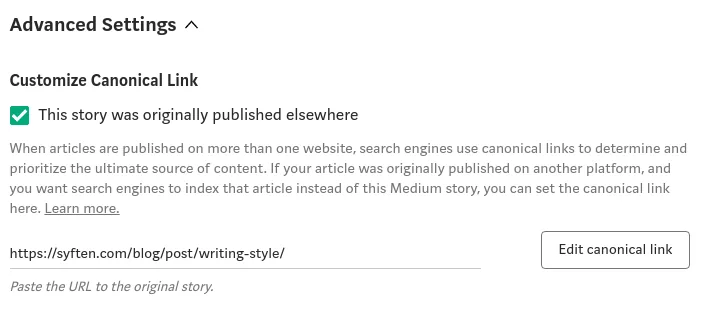
The trick is simple. Once you publish a post on your blog repost it to Medium and set the Canonical Link to tell Google that your site is the original one. Medium becomes just a mirror.
To set the Canonical Link you have to expand the “Advanced Settings” section. The option is hidden so that you only find it if you’re specifically looking for it.
When I first started my blog it was nearly invisible to Google. I had no organic traffic. But the Medium cross-post consistently attracted visitors.
Put the blog in a subdirectory
Now that you have your domain you need to decide on your blog’s URL.
Internet lore has it that while blog.example.com is easier to set up, example.com/blog will get you more organic traffic.
While it’s hard to “prove” anything related to SEO, it’s logical to assume that a subdomain will make search engines perceive your blog as a separate product.
Big brands prefer the subdirectory approach and that’s what experts advise you should be doing as well.
Do the necessary extra work and host your content under your main domain.
Keep dates out of evergreen URLs
blog/how-to-start-a-blog/ or blog/2020-01-05-how-to-start-a-blog/?
"Blog" is short for “weblog”, but very few of them actually “log” anything.
A date makes sense for product updates, personal blogs, or the news. Otherwise, skip it.
For an evergreen article, the date is irrelevant. Plus, it becomes even more misleading as you keep your article up to date.
patio11 started with dates in the paths but now regrets it.
Keep slugs short and stable
blog/how-to-start-a-business-blog/ or blog/blog/? (well, this one is silly but you get the idea)
Don’t put the whole title in the URL, as you might want to change it. Because it’s better to update an article than write a new one “Best Apps in 2019” will become “Best Apps in 2020”.
Your articles will need constant maintenance and you’ll keep rewriting them. Don’t get stuck with a crappy title. Keep the URL minimal.
Make RSS easy to find
There was a blog megathread on Hacker News recently. Here are a few comments:
Very interesting topics, but I had to search the source to find your RSS feed!
please can I ask you to remember to add an RSS feed to your blog?
Really interesting […] I wish you had an RSS feed though :)
Interesting. Could you add an RSS feed?
Pick one canonical URL for every page
If both /blog/ and /blog return a 200 OK then you’ve got a duplicate content problem. Make sure your web server has a unified slash policy and uses 301 Moved Permanently for the “wrong” URLs.
And remember about setting canonical links when reposting your articles to other blogs.
Make the next step obvious
There is no point in running a business blog if visitors read your articles, like them, and still have no clear next step.
That does not have to mean a newsletter popup. For many business blogs, the better next step is a product page, demo request, free trial, documentation page, pricing page, contact link, RSS feed, or a related article that moves the reader closer to solving the problem. For appointment-based businesses, that next step can be a booking page powered by appointment scheduling software rather than a generic contact form.
Decide this before you publish. If the blog is supposed to generate trials, put useful product paths near articles where the product naturally helps. If it is supposed to build trust, make RSS, author pages, and related resources easy to find.
Do not confuse technical SEO with distribution
Technical SEO matters most when it prevents obvious self-inflicted wounds: broken redirects, duplicate URLs, missing canonical tags, slow pages, inaccessible content, or bad internal links. But once the basics are clean, polishing tags will not make an ignored article popular.
Each article has a separate rank and your domain authority is secondary. You still need a way to get the right people, mentions, and links to your articles before you can expect organic traffic.
Blogging for business is the best free course about SEO I’ve ever seen.
The technical setup only gets you to the starting line
Make your blog stand out, but not your writing style.
Write a few posts worth sharing.
And then promote it. Yes, you do have to promote it. Otherwise, nobody will see it. Successful bloggers advocate spending 20% writing the content and 80% promoting it. Accept it, there is no way around that.
Find the communities before you need traffic
SEO takes time and building backlinks takes effort. If your product serves a small niche it’s better to make a name for yourself in the community instead. Don’t wait for people to find you, make yourself seen.
Check out the resources below. And when your blog is up and running continue to my detailed guide to content marketing.
Resources
- Blogging for Business. The best SEO course around.
- Website Authority Checker.
- Backlink Checker.
- A Small Warning About Unsplash.